From 52 to 97: How I Fixed My Website's Performance Score Without Breaking Anything
A slow website costs you visitors before they even read a word. Here is exactly what I did to take the FusionLabs site from a 52 mobile performance score to 97, and what you can do too
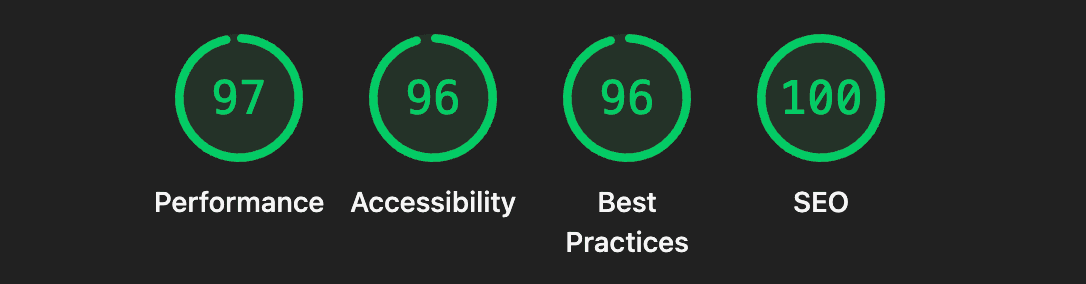
A few weeks ago I ran a Google Lighthouse audit on the FusionLabs site and felt that familiar sting of a 52 on mobile performance. Everything else looked fine. SEO was at 100. Best Practices sat at 96. Accessibility was solid. But that performance number was dragging the whole experience down.
The frustrating part is that the site looked fast to me. It was only when I checked what the browser was actually doing under the hood that the problem became obvious.
The culprit: third-party scripts loading at the wrong time
Every tool you add to a website, whether it is an analytics tracker, a tag manager, a chat widget, or a form library, comes with a cost. The browser has to fetch those scripts from an external server, run a DNS lookup, open a new connection, and execute the code, all before it can finish painting what the user actually came to see.
If you have optimized your own code but your site still loads slowly, third-party scripts are usually the reason. That was exactly my situation.
Nearly half of JavaScript execution time on modern websites comes from third-party sources. Scripts that seem harmless individually stack up fast. A tracking pixel here, a tag manager container there, and suddenly the browser is handling six external connections before it has rendered a single line of content for the user.
What I actually did
The first step was a full audit. I went through every script loading in the site head and asked a simple question: does this need to run before the page is visible to the user?
For most of them, the answer was no.
Step 1: Remove what you do not need
Eliminating a third-party entirely is the most impactful optimization you can make. I removed a couple of scripts that had crept in during earlier experiments and were no longer doing anything useful. No configuration needed. Just gone. This alone moved the needle noticeably.
Step 2: Defer everything that is not critical
For the scripts I wanted to keep, I changed how they load. Using the async and defer attributes ensures that script downloads do not block DOM construction and page rendering. The script downloads in the background without preventing the browser from building the page the user sees
The practical result is that the browser renders your content first and handles the tracking and analytics after. The user sees a fast page. The data still gets collected.
Step 3: Load scripts only on the pages that need them
A common pattern across many websites is that scripts are loaded globally, regardless of whether they are needed on a particular page. A better approach is to load scripts only when they are actually needed. This reduces unnecessary work during the initial page load and allows the browser to focus on rendering content first.
Step 4: Delay non-essential scripts until after the page is interactive
Delaying non-essential scripts from tools like Google Tag Manager can make a noticeable difference. Scripts that are resource-intensive and occasionally block the main thread should be loaded only after critical resources.
Some tools, like PostHog for analytics, support initializing after page load without losing any meaningful data. You get the same insights, just without the performance penalty.
The result
After working through these four steps, the Lighthouse mobile score went from 52 to 97. Desktop was already strong at 97 before. Now both are in the green across the board: Performance, Accessibility, Best Practices, and SEO all sitting at 96 or above.
The site did not change visually. No features were removed. The analytics still work. It just loads significantly faster now, which means visitors stay longer, search engines rank it better, and the first impression is what it should be.
A note on mobile specifically
Mobile performance is almost always harder to hit than desktop. With over 70% of web traffic coming from mobile, mobile performance is non-negotiable. Lighthouse simulates a mid-range device on a slower network, which is why the mobile score tends to expose problems that desktop hides. If your mobile score is lagging while desktop looks fine, third-party scripts are almost always where to look first.
Where to start if your score is low
Open PageSpeed Insights or run a Lighthouse audit in Chrome DevTools. Look at the Opportunities section. If you see "Reduce the impact of third-party code" near the top, that is your answer. Go through your scripts one by one. Remove the ones you do not need. Defer the ones you do. Scope them to the right pages.
It is not glamorous work, but it is the kind of thing that separates a site that ranks from one that does not.